Your email, in a vault you own.
Mailcellar copies every message from your mail accounts to your Mac as plain .eml files. Travel through years of mail on the timeline, read without being tracked, and free up server space only after each copy is proven, byte for byte.
Pay once · macOS 14+ · Apple silicon & Intel · ~5 MB download · Already bought? Download Mailcellar
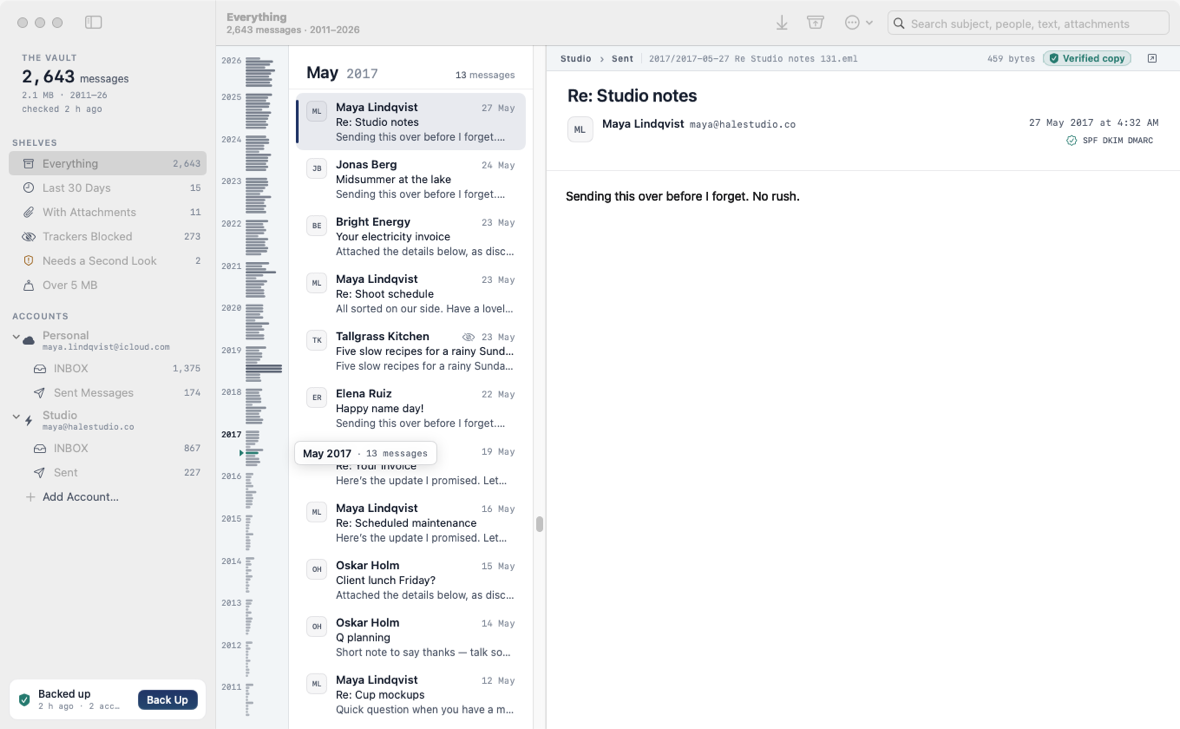
A working model, not a video — sample data. The vault and every message in it are made up, and nothing connects to a mail server. Click Verified copy to see what it checks, or open Free Up Space and type the confirmation yourself.
- Pay once, no subscription
- No account with us
- Plain .eml files, no lock-in
- Native on Apple silicon & Intel
- 14-day refund
A backup you can actually read.
Mailcellar is a mail archive first. It never sends mail, and it never changes your mailbox unless you ask it to free up space.
A vault, not another inbox
Every message is copied to your Mac as a plain .eml file, filed by account, folder and year. Open any of them in Apple Mail, Outlook or Thunderbird. No lock-in.
The Timeline Spine
Your whole vault as years and months beside the list, each month a bar sized by how much mail it holds. Hover to read a month; drag to travel there.
Verified copies
Every message carries a seal: “Verified copy” means its file holds exactly the bytes your server sent and reads as a complete email.
Free Up Space, safely
Pick a folder and an age. Mailcellar checks every copy, keeps anything doubtful on the server, and releases the rest only after you type the confirmation.
Read without being watched
Remote images and tracking pixels stay off when a message opens. Show images with one click; known trackers stay blocked even then.
Needs a Second Look
Shows the SPF, DKIM and DMARC results your provider recorded, and flags look-alike sender addresses, replies that go somewhere else and links whose text names a different site.
Search and shelves
Results appear as you type, across subjects, people and text. Save a search as a smart filter, or use the shelves: Last 30 Days, With Attachments, Trackers Blocked, Over 5 MB.
Incremental, read-only backups
Pick folders per account and press Back Up Now, or let it back up every few hours while it’s open. Only new mail downloads, and nothing is marked as read.
Import old mail
Bring in .eml files and .mbox exports — from Apple Mail or Google Takeout, say — so everything lives in one searchable vault.
Weighing up email backup tools? Read the guide to the best ones for Mac.
Mailbox full? Clear it without losing a thing.
Choose an account, a folder and an age. Mailcellar matches every older message on the server to its .eml in your vault before anything is removed.
A copy only counts when its file exists, holds exactly the bytes the server reports, and reads as a complete email. Anything missing, partial or changed stays on the server, with the reason listed. Then you type RELEASE and the number of messages, and only the verified ones leave.
Documents/Mailcellar/
  Personal/
    INBOX/
      2025/
        2025-03-09 Lunch on Friday 4412.eml
        2025-03-11 Your receipt 4418.eml
  Studio/
    Sent/
      2017/ …
  Imported/
    takeout-2019/ …
Every screen, light and dark.
Screenshots straight from Mailcellar, with a made-up vault. Flip between light and dark.


What stays. What connects.
Mailcellar talks to your mail provider directly. Your mail never passes through us.
Stays on your Mac
Your mail, and everything Mailcellar knows about it.
- ✓Every message, as an .eml fileIn
~/Documents/Mailcellar, or a folder you choose - ✓The search indexNext to the vault, in a hidden folder
- ✓Your mail passwordAn app-specific password, kept in the macOS Keychain
- ✓How you use itNo analytics or tracking in the app
Connects
Your own mail server, plus two small requests.
- 1Your mail provider, over IMAPEncrypted and direct. Read-only, except Free Up Space after you confirm
- 2License checkYour key and an activation ID, to Dodo Payments
- 3Update checkApp name and version, to
mailcellar.newmac.app
Remote images load from the sender only when you click “Show images”. The full list, for every app, is in the privacy policy.
Pay once. Keep it.
One payment, no subscription. Choose how many Macs you’ll use Mailcellar on.
3 Macs
For your home and work Macs
Checkout opens soon. The buttons above go live here the moment it does.
Every plan includes
- One payment, no subscriptionEvery feature, yours to keep.
- License key by emailSent the moment you pay. Activate in one click.
- Move between MacsUse “Deactivate this Mac”, then activate on the new one.
- Free updatesNew versions install themselves.
- 14-day refundNot for you? Read the refund policy.
- macOS 14 or laterNative on Apple silicon & Intel.
Already bought? Download Mailcellar · .zip · Install help
Questions, answered.
What does “Verified copy” mean?
That the message’s .eml file is in your vault, holds exactly the number of bytes your server reported, and reads as a complete email. Copies saved before Mailcellar recorded server sizes show “Saved copy” until the next backup checks them.
What’s an app-specific password and why do I need one?
Providers like Google, Apple, Yahoo and Fastmail let you create a separate password for a single app. Mailcellar uses it to sign in over IMAP, and the add-account screen walks you through making one for each provider. You can revoke it at any time without changing your main password.
Does it work with Outlook.com?
It can, if your Microsoft account still accepts app passwords for IMAP. Microsoft is moving personal accounts to modern (OAuth) sign-in only, which Mailcellar doesn’t support yet.
Does Mailcellar change anything in my mailbox?
Backups only read: folders are opened read-only and messages are fetched without marking them as read. The server only changes when you run Free Up Space and type the confirmation, and then only messages with a verified copy are removed. Your provider may keep them in Trash for a while.
Where is my mail stored?
In Documents/Mailcellar by default (you can pick another folder in Settings), as one .eml file per message, filed by account, folder and year. The search index sits next to it in a hidden folder.
Can I keep using my normal mail app?
Yes. Mailcellar is a backup and reader, not a mail client — it doesn’t send mail.
macOS says it can’t verify the developer.
Mailcellar is distributed directly from this website. Here’s how to open it the first time.
Is there a free trial?
No. Use the working model at the top of this page, or watch the demo video, to see exactly how Mailcellar works. If it turns out not to be for you, you can ask for a refund within 14 days — see the refund policy.
Can I use Mailcellar on more than one Mac?
Yes. The 3-Mac and 5-Mac plans cover several Macs with one license key. Any license can move to a new Mac: choose “Deactivate this Mac” in Mailcellar on the old one, then activate on the new one.
Put your mail somewhere you control.
Add an account, pick folders, press Back Up Now. The vault is yours from the first message.